Posts

Cisco Nexus Switch SSH login with YubiKey using X.509 certificate - Part I (two-factor and local AAA)

Image
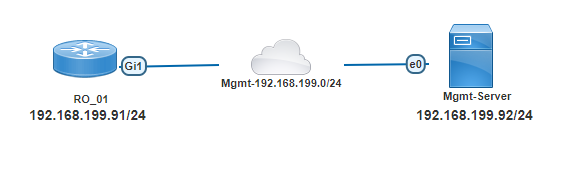
In the blog we will configure Cisco Nexus switch SSH login with YubiKey smartcards and X.509 certificates. The implementation has a limitation on the SSH client side. We must use a proprietary SSH-client. As of my knowledge; only two commercial/proprietary SSH-client support the functionality - SecureCRT and  Pragma Fortress SSH Client .  It will be two part series - in Part-I - AAA for SSH will be implemented locally in the switch and in Part-II - AAA will be implemented in a remote AAA server with TACACS+ protocol (Cisco ISE). We will use below simple topology -  01 - Network Topology We have already configured a YubiKey with user certificate/key (user's public/private key). Certificate related configuration like - configuring CA, issuing user certificates from the CA and transferring the user's certificates to YubiKey; will not be covered in this blog. One can easily find those by using simple Google search. This method of X.509 certificate based SSH-Login works sole...

DHCP Option 82 in ISP network - Customer IP assignment (DHCP Snooping & IP Source Guard) with Cisco IOS

Image
The other day; I was testing how my ISP is protecting itself from customer exploitation. Normally I directly connect my router to the network cable provided by ISP. This time around I have connected a switch to the network cable from the  ISP. Then I have configured the switch port (ISP connection) to an access VLAN and also configured 2 other switch ports to the same vlan. Then I have connected 2 routers and expecting they will be assigned 2 IP addresses (1 for each router). To my surprise only one of the router was getting dynamically assigned IP adress from the ISP. The second router was not getting any IP adress at all. I even went further to set an static IP adress (from ISP network) to the second router. Another surprise - even with static IP assignment, that router could not even ping the ISP's gateway. That got me thinking - how the ISP is protecting itself from such customer exploitation in the first place. Disclaimer - This is just a story to show the readers how th...

Working with Cisco Support APIs using Python (Part I)

Image
Now a days the buzzword is consume everything using automation through programming. And one way of the consumption is achieved by using REST API and JSON. Let's talk about one such API provided by Cisco - Support APIs. What is Cisco Support APIs? Cisco's own definition is - Cisco Support APIs allows us to programmatically access and consume Cisco Support data in the cloud in a simple, secure, and scalable manner. Let's make our own easily explainable definition - We have a Cisco Catalyst Switch; we want to know detail information about our switch like - bug lists, end-of-life data, recommended software suggestions etc. The Cisco Support APIs allows us to manage all those above and much more by consuming their support api's from cloud. Before going further on I need to introduce two URLs which is required to follow through this blog post -  https://apiconsole.cisco.com . This is the administrative portal where we configure our API access, tokens etc. https://dev...

Cisco IOS-XE based Router/Switch updating IOS in install mode

Image
With IOS-XE based network devices, Cisco introduced a new way to run the operating system which is called "install mode" . The old/legacy way to load the operating system is still there which is now called "bundle mode" . The recommended way to run the OS in IOS-XE based devices is install mode.  With the new "install mode" all the operating system files are already extracted as "pkg" files and they are loaded into the device's memory using a provisioning file named "packages.conf" . As OS files are already extracted and directly loaded into the memory; this mode has faster boot time and consumes less RAM  than bundle mode (legacy) and is the recommended method. Cisco has long list of documentation; how to use "install mode" in the network devices. In today's post I will show how to use install mode during firmware update where the network administrator has full control. Let's introduce our topology -  Topology ...