Posts

Showing posts with the label Fortigate

SSL VPN with Fortigate firewalls - Part II (Certificate authentication)

Image
In last blog we have looked at how to configure SSL VPN in fortigate firewall with username/password authentication. Now we will replicate the same setup but with certificate authentication. Our setup will use user-certificate ; not machine-certificate authentication. Our topology looks like below - 01 - Network Topology The topology is very simple as our goal is to look at the SSL VPN implementation in Fortigate firewalls. The firewall has one internal network (10.10.1.0/24) where we have one windows server (Srv-Win-Ad-01 - 10.10.1.25/24) which is running AD domain and certification services and one linux server (Srv-Lin-01 - 10.10.1.26/24) . Also the external network (192.168.199.0/24) which provides internet connectivity. And a domain joined client (Clt-Win-01) which will run the VPN client to get access to the internal network. Basic IP connectivity setup The basic IP configuration of fortigate firewall is given below - config system interface     edit "port1"   ...

SSL VPN with Fortigate firewalls - Part I (LDAP authentication)

Image
Today we will look at how to configure and troubleshoot SSL VPN in Fortigate firewalls with LDAP authentication . In another blog post we will implement the same thing with but with certificate authentication . Our topology looks like below - 01 - Network Topology The topology is very simple as our goal is to look at the SSL VPN implementation in Fortigate firewalls. The firewall has one internal network (10.10.1.0/24) where we have one windows server (Srv-Win-Ad-01 - 10.10.1.25/24) which is running AD domain and certification services and one linux server ( Srv-Lin-01 - 10.10.1.26/24) . Also the external network (192.168.199.0/24) which provides internet connectivity. And a domain joined client (Clt-Win-01) which will run the VPN client to get access to the internal network. Basic IP connectivity setup The basic IP configuration of fortigate firewall is given below - config system interface     edit "port1"         set vdom "root"     ...

Fortigate firewall AAA Configuration for management with TACACS+ protocol and Cisco ISE

Image
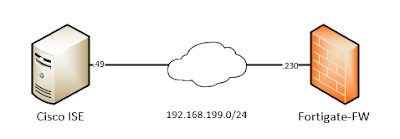
In this blog I will write about how to implement AAA services in Fortigate firewalls using Cisco ISE as an authentication server with TACACS+ protocol. First good to know our limitations. AAA means - Authentication (supported by ISE TACACS+), Authorization (partially supported by ISE TACACS+; Fortigate implements Admin-Profiles; so what a user can/cannot do is defined locally in the firewall with "Admin Profiles"; ISE just instructs the firewall to allocate one of those profiles), Accounting (not supported; instead configure syslog to get accounting data, Fortigate firewalls generate syslog messages for configuration changes made by a user). Let's jump to our configuration. Our topology is very simple; one Fortigate firewall and Cisco ISE server connected with the same management network which looks like below -  01 - Network Topology We have a management network 192.168.199.0/24. The firewall is at  .230  and Cisco ISE is at  .49  IP address. We are running...