Posts

Showing posts with the label Arista

Private VLAN on Arista EOS Switch (How ISP isolates traffic between subscribers)

Image
The other day, I was looking at the arp table entry for my home router and found a funny thing going on - $ show arp Address                 HWtype    HWaddress              Iface 10.10.10.1              ether        04-96-AF-EF-C6-53    eth0 10.10.10.10            ether        04-96-AF-EF-C6-53    eth0 Above arp table is an example hiding the actual IP addresses and MAC addresses. Here my IP address is let's say - 10.10.10.50/24 and GW is 10.10.10.1 . Now the question comes why another subscriber of the ISP in the same subnet (10.10.10.10) also have same mac address as my GW (04-96-AF-EF-C6-53). We are in the same IP network/VLAN (ISP definitely configured those), but my router cannot see the actual MAC address of other devices in the network. The reason is that my ISP is i...
Arista EOS AAA configuration for management with TACACS+ protocol and Cisco ISE (Part II)

Image
This is a continuation from my pervious blog post . This time we will do again AAA with Arista switches with TACACS protocol. Last time, we used locally defined user-roles in the switch to authorize what cli commands a user is allowed to run. Now we will use ISE's "TACACS Command Sets" instead of sending user-roles by using "AV-Pairs" . Advantage of "TACACS Command Sets" is that we will define different sets of cli commands which different users are allowed to run according to their access level. All of this will be done centrally in ISE/TACACS server . No need of defining network-roles in each device locally. The pitfall is that for every typed command by a user; the network device (router/switch) will ask the ISE server to authorize that command according to "Command Sets". If "Command Sets" permits, it sends a positive acknowledgement to the device and in turn the device executes the user cli command. The opposite happens wh...

Arista EOS AAA configuration for management with TACACS+ protocol and Cisco ISE (Part I)

Image
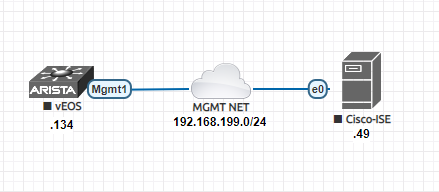
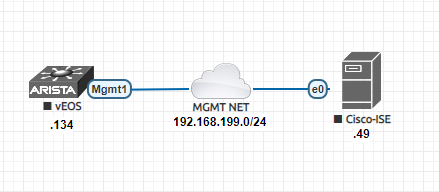
Today I will write about AAA configuration (SSH authentication, authorization and accounting) for Arista EOS switches with Cisco ISE as authentication server and AAA protocol will be TACACS . Our topology is very simple. One Arista switch and One Cisco ISE server is running on the same network. Our topology looks like below - 01 - Network Topology We have a management network 192.168.199.0/24. The switch is at .134 and Cisco ISE is at .49 IP address. We are running the latest version of ISE - version 3.0. Let's define our AAA requirements - Arista switches comes with two pre defined user roles - "network-admin" and "network-operator" . We will use those two roles. Every user after successful authentication from tacacs server (ISE), will be authorized as either "network-admin" or "network-operator" role. In turn these two roles will determine read-write or read-only access to the switch. N ote: With TACACS, we can also do individual cl...

Arista EOS AAA configuration for management with Radius protocol and Cisco ISE

Image
Today I will write about AAA configuration (SSH authentication, authorization and accounting) for Arista EOS switches with Cisco ISE as authentication server and AAA protocol will be Radius . Our topology is very simple. One Arista switch and One Cisco ISE server is running on the same network. We are not focusing on network segmentation or security. We are focusing on configuration of AAA with radius protocol from switch management perspective (ssh/telnet). Our topology looks like below - 01 - Network Topology We have a management network 192.168.199.0/24. The switch is at .134 and Cisco ISE is at .49 IP address. We are running the latest version of ISE - version 3.0. Let's define our AAA requirements - Arista switches comes with two pre defined user roles - "network-admin" and "network-operator" . We will use those two roles. One user after successful authentication from radius server (ISE), will be authorized as "network-admin" and will get read-...