Posts

Showing posts with the label Cisco IOS

DHCP Option 82 in ISP network - Customer IP assignment (DHCP Snooping & IP Source Guard) with Cisco IOS

Image
The other day; I was testing how my ISP is protecting itself from customer exploitation. Normally I directly connect my router to the network cable provided by ISP. This time around I have connected a switch to the network cable from the  ISP. Then I have configured the switch port (ISP connection) to an access VLAN and also configured 2 other switch ports to the same vlan. Then I have connected 2 routers and expecting they will be assigned 2 IP addresses (1 for each router). To my surprise only one of the router was getting dynamically assigned IP adress from the ISP. The second router was not getting any IP adress at all. I even went further to set an static IP adress (from ISP network) to the second router. Another surprise - even with static IP assignment, that router could not even ping the ISP's gateway. That got me thinking - how the ISP is protecting itself from such customer exploitation in the first place. Disclaimer - This is just a story to show the readers how th...
802.1x wired authentication with Cisco IOS - Part II (Authenticator/Switch configuration)

Image
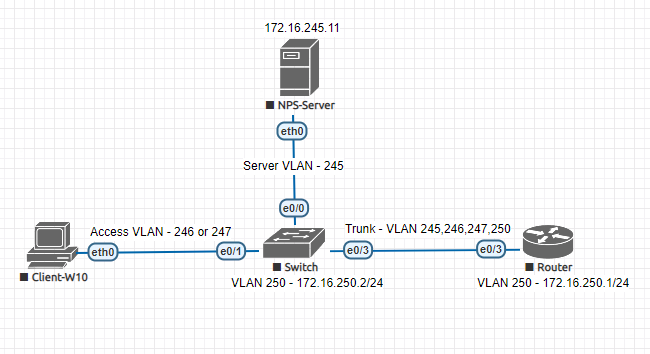
In part I , we have configured client and server for our wired 802.1x authentication. Now we will configure the remaining part which is the configuration of authenticator/switch. We are using Cisco switch with IOS version 15. Our topology looks like below - Topology for 802.1x wired In our topology we have 4 vlans which are server (id 245 - 172.16.245.0/24), client (id 246 - 172.16.246.0/24), guest (vlan id 247 - 172.16.247.0/24) and mgmt (vlan id 250 - 172.16.250.0/24). The NPS server has an IP adress of  - 172.16.245.11/24. The router is the gateway to all of the vlans. The client will get an IP adress from vlan 246 or 247 depending on 802.1x authentication status. The NPS-Server also acting as a DHCP server for different networks. We are testing only dot1x authentication. There is no traffic filtering applied between client and guest vlan. When a client is placed into vlan 246 (client) or guest (246) by dot1x, it has the same level of network access. Here we are t...

802.1x wired authentication with Cisco IOS - Part I (Supplicant/Client and Authentication Server/Radius Configuration)

Image
Again a multipart series. This time around it is about 802.1x wired authentication (switch port) with Windows NPS  as Radius server and Cisco IOS Switch. In part I , we will look at client/supplicant (Windows 10) and server/Radius (Windows NPS) configuration. And in part II ,   we will look at Cisco switch/authenticator configuration. Let's begin with our topology. Topology for 802.1x wired In our topology we have 4 vlans which are server (id 245 - 172.16.245.0/24), client  (id 246 -  172.16.246.0/24 ),  guest (vlan id 247  -  172.16.247.0/24 ) and mgmt  (vlan id 250  -  172.16.250.0/24 ). The NPS server has an IP adress of   -  172.16.245.11/24. The router is the gateway to all of the vlans. The client will get an IP adress from vlan 246 or 247 depending on 802.1x authentication status. The NPS-Server also acting as a DHCP server for different networks. We are testing only dot1x authentication. There...