Convert Cisco IOS-XE router as switch (BDI - Bridge Domain Interface)
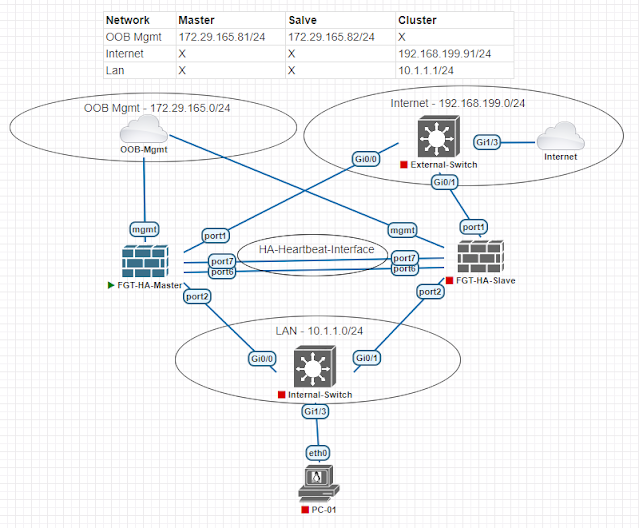
I was trying to connect a firewall cluster (Active-Passive) with a Cisco IOS-XE based router. Then faced a problem - I cannot connect two different firewalls in a cluster to the router; because the router's interfaces operates in layer-3 mode. The interfaces in the router does not support layer-2 switching.
Before going further - let's have a look on your topology -
 |
| 01 - Network Topology |
If we look at the topology above - we can see the problem - if it was not a router; just a layer-3 switch; we can configure like below in the layer-3 switch -
interface gi1
channel-group 1 mode active
!
interface gi2
channel-group 1 mode active
!
int port-channel 1
switchport
switchport mode trunk
!
But the problem is - there is no "switchport" command to enable layer-2 vlan processing in a Cisco router. Also we have a firewall cluster - it is not possible to support the cluster when a failover happens from the router's perspective.
Cisco IOS-XE routers solves this problem by enabling layer-2 processing on it's interface with bridge-domain and bridge-domain-interface.
We will not cover - Fortigate specific settings like - how to configure HA, Link-Aggregation, Vlan etc. Let's just assume all of those are configured and Fortigate firewall's interface looks like below -
 |
| 02 - Fortigate interface configuration |
Now we will configure the IOS-XE based router. We will need two LACP enable port-channel interfaces; one for primary firewall and another one for secondary firewall. Only one of the port-channel interface will be used for traffic forwarding - because firewall is running in active-passive mode.
interface GigabitEthernet1
description FGT-01-Primary-PO1-Member
no ip address
channel-group 1 mode active
!
interface GigabitEthernet2
description FGT-01-Primary-PO1-Member
no ip address
channel-group 1 mode active
!
interface GigabitEthernet3
description FGT-02-Secondary-PO2-Member
no ip address
channel-group 2 mode active
!
interface GigabitEthernet4
description FGT-02-Secondary-PO2-Member
no ip address
channel-group 2 mode active
!
At this stage will will activate layer-2 switching on the port-channel interfaces by configuring bridge-domain.
interface Port-channel1
description FGT-01-Primary-PO1
no ip address
!!! Service instance associates the port-channel interface with an Ethernet Virtual Circuit (EVC) in IOS-XE.
!!! Under service instance we define how we will process a layer-2 frame.
!!! Service instance number , vlan number and bridge-domain number do not need to be the same. We used same value to make the configuration easily understandable.
!!! For every vlan processed by the interface; we need to create a "service instance".
service instance 1 ethernet
!!! How to process vlan 1 untagged layer2 frame.
encapsulation untagged
!!! Which bridge-domain will process vlan 1 traffic.
bridge-domain 1
!!! Service instance for vlan 10.
service instance 10 ethernet
!!! How to process vlan 10 tagged layer-2 frame.
encapsulation dot1q 10
!!! The "rewrite" command causes the router to remove the VLAN tag before sending the frame to the bridge-domain, and to re-add the VLAN tag as the frame leaves the bridge-domain back to the physical interface.
rewrite ingress tag pop 1 symmetric
!!! Which bridge-domain will process vlan 10 traffic.
bridge-domain 10
!!! Service instance for vlan 11.
service instance 11 ethernet
!!! How to process vlan 11 tagged layer2 frame.
encapsulation dot1q 11
!!! The "rewrite" command causes the router to remove the VLAN tag before sending the frame to the bridge-domain, and to re-add the VLAN tag as the frame leaves the bridge-domain back to the physical interface.
rewrite ingress tag pop 1 symmetric
!!! Which bridge-domain will process vlan 11 traffic.
bridge-domain 11
!
!!! Configuration for the secondary firewall.
interface Port-channel2
description FGT-02-Secondary-PO2
no ip address
service instance 1 ethernet
encapsulation untagged
bridge-domain 1
service instance 10 ethernet
encapsulation dot1q 10
rewrite ingress tag pop 1 symmetric
bridge-domain 10
service instance 11 ethernet
encapsulation dot1q 11
rewrite ingress tag pop 1 symmetric
bridge-domain 11
!
Let's assign some IP address to the router in vlan 1, vlan 10 and vlan 11, so that we can do basic ping testing.
!!! Router's vlan 1 interface.
interface BDI1
description Vlan1-L3-Interface
ip address 10.10.1.2 255.255.255.0
!
!!! Router's vlan 10 interface.
interface BDI10
description Vlan10-L3-Interface
ip address 10.10.10.2 255.255.255.0
!
!!! Router's vlan 11 interface.
interface BDI11
description Vlan11-L3-Interface
ip address 10.10.11.2 255.255.255.0
!
We can now ping from active firewall to the router's bdi-interfaces.
FGT-01-Primary # execute ping 10.10.1.2
PING 10.10.1.2 (10.10.1.2): 56 data bytes
64 bytes from 10.10.1.2: icmp_seq=1 ttl=255 time=1.2 ms
64 bytes from 10.10.1.2: icmp_seq=2 ttl=255 time=0.6 ms
FGT-01-Primary # execute ping 10.10.10.2
PING 10.10.10.2 (10.10.10.2): 56 data bytes
64 bytes from 10.10.10.2: icmp_seq=1 ttl=255 time=0.5 ms
64 bytes from 10.10.10.2: icmp_seq=2 ttl=255 time=0.9 ms
FGT-01-Primary # execute ping 10.10.11.2
PING 10.10.11.2 (10.10.11.2): 56 data bytes
64 bytes from 10.10.11.2: icmp_seq=1 ttl=255 time=0.6 ms
64 bytes from 10.10.11.2: icmp_seq=2 ttl=255 time=0.7 ms
We have enabled layer-2 bridging on the router's port-channel interfaces. Can we get the mac address table from the router? Yes we can like below -
Router-01-IOSXE#show bridge-domain 1
Bridge-domain 1 (4 ports in all)
State: UP Mac learning: Enabled
Aging-Timer: 300 second(s)
Unknown Unicast Flooding Suppression: Disabled
BDI1 (up)
Port-channel1 service instance 1
Port-channel2 service instance 1
AED MAC address Policy Tag Age Pseudoport
-----------------------------------------------------------------------------
!!! Fortigate firewall's vlan 1 interface mac address learned on Port-Channel1.
0 0009.0F09.C800 forward dynamic 91 Port-channel1.EFP1
- 001E.1425.93BF to_bdi static 0 BDI1
Router-01-IOSXE#show bridge-domain 10
Bridge-domain 10 (4 ports in all)
State: UP Mac learning: Enabled
Aging-Timer: 300 second(s)
Unknown Unicast Flooding Suppression: Disabled
BDI10 (up)
Port-channel1 service instance 10
Port-channel2 service instance 10
AED MAC address Policy Tag Age Pseudoport
-----------------------------------------------------------------------------
!!! Fortigate firewall's vlan 10 interface mac address learned on Port-Channel1.
- 001E.1425.93BF to_bdi static 0 BDI10
0 0009.0F09.C800 forward dynamic 108 Port-channel1.EFP10
Router-01-IOSXE#show bridge-domain 11
Bridge-domain 11 (4 ports in all)
State: UP Mac learning: Enabled
Aging-Timer: 300 second(s)
Unknown Unicast Flooding Suppression: Disabled
BDI11 (up)
Port-channel1 service instance 11
Port-channel2 service instance 11
AED MAC address Policy Tag Age Pseudoport
-----------------------------------------------------------------------------
!!! Fortigate firewall's vlan 11 interface mac address learned on Port-Channel1.
0 0009.0F09.C800 forward dynamic 153 Port-channel1.EFP11
- 001E.1425.93BF to_bdi static 0 BDI11
Let's do a firewall failover. After failover mac address learning should happen on port-channel2.
!!! Manual failover from primary firewall.
FGT-01-Primary # diagnose sys ha reset-uptime
!!! Ping to router's vlan 10 interface from the new primary firewall.
FGT-01-Secondary # execute ping 10.10.10.2
PING 10.10.10.2 (10.10.10.2): 56 data bytes
64 bytes from 10.10.10.2: icmp_seq=0 ttl=255 time=1.8 ms
64 bytes from 10.10.10.2: icmp_seq=1 ttl=255 time=0.6 ms
Router-01-IOSXE#show bridge-domain 10
Bridge-domain 10 (4 ports in all)
State: UP Mac learning: Enabled
Aging-Timer: 300 second(s)
Unknown Unicast Flooding Suppression: Disabled
BDI10 (up)
Port-channel1 service instance 10
Port-channel2 service instance 10
AED MAC address Policy Tag Age Pseudoport
-----------------------------------------------------------------------------
- 001E.1425.93BF to_bdi static 0 BDI10
!!! Fortigate firewall's vlan 10 interface mac address learned on Port-Channel2.
!!! We are leaning mac address on Port-Channel2 because of failover.
0 0009.0F09.C800 forward dynamic 291 Port-channel2.EFP10
With above we have verified firewall failover has happened and the same mac address of firewall's vlan 10 interface now is learned on the router's port-channel 2 interface.
With that our blog for today is completed.
Comments
Post a Comment